

A Text Input exposes a free-text field to the operator. Blueprint receives the current string value through a bound event. The moment the event fires depends on the Commit Change setting.

Configuration

Text inputs are declared inside UICategories on the xrlive_UIpanel component. Set Type to Xrlive Text and fill in the fields below.
Use true for inputs that trigger heavy operations (queries, scene reloads, network calls) to avoid firing on every keystroke. Use false when the visual needs to react in real time as the operator types.

Blueprint API

Call Find Control by Name on the xrlive_UIpanel reference, passing the text input’s Name. Feed the Return Value into Bind Event to On Text Change. Create a Custom Event and connect it to the Event pin.
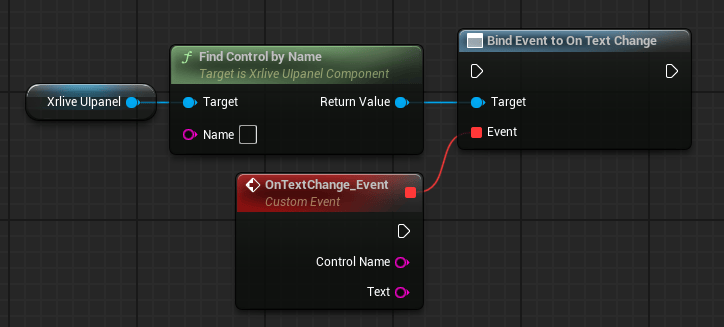
Blueprint graph showing Xrlive Ulpanel reference connected to Find Control by Name, whose Return Value feeds the Target pin of Bind Event to On Text Change. A Custom Event node named OnTextChange_Event is connected to the Event pin and exposes two output pins: Control Name (string) and Text (string).

Text input wiring — Find Control by Name feeds Bind Event to On Text Change

The custom event exposes two output pins: