

Configuration
Color pickers are declared insideUICategories on the xrlive_UIpanel component. Set Type to Xrlive Color Picker and fill in the fields below.
Blueprint API
Standard mode
Use this wiring when the operator controls the color manually. CallFind Control by Name on the xrlive_UIpanel reference, passing the color picker’s Name. Feed the Return Value into Bind Event to On Color Picked. Create a Custom Event and connect it to the Event pin.
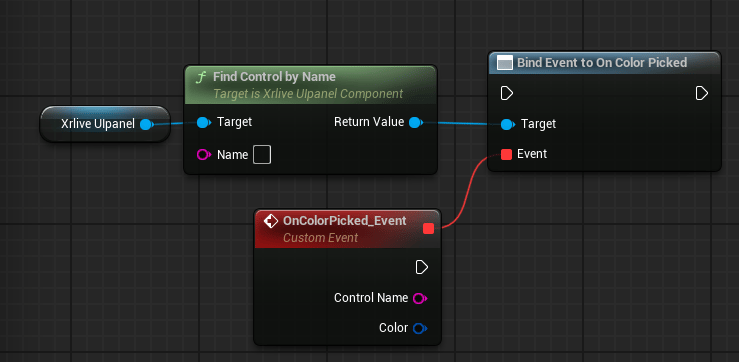
Standard color picker wiring — Find Control by Name feeds Bind Event to On Color Picked
Audio Reactive mode
When Audio Reactive is enabled, wireBind Event to On Beat Color in addition to the standard bind. This event fires in sync with the audio beat signal.
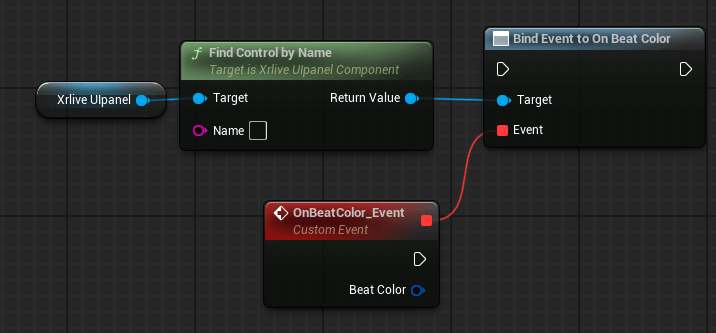
Audio-reactive color picker wiring — Bind Event to On Beat Color replaces the standard bind node
When Audio Reactive is enabled, both bindings should be wired:
Bind Event to On Color Picked handles manual operator input and Bind Event to On Beat Color handles the audio beat signal. The two events fire from independent sources and do not interfere with each other.