

A Dropdown presents the operator with a fixed list of string options. When the operator selects an item, Blueprint receives the selected string through a bound event.

Configuration

Dropdowns are declared inside UICategories on the xrlive_UIpanel component. Set Type to Xrlive Dropdown and fill in the fields below.
If Selected Item is left empty or does not match any entry in Dropdown Options, the dropdown will start with no selection at runtime. Always verify that the value is an exact match of one of the declared options.

Blueprint API

Call Find Control by Name on the xrlive_UIpanel reference, passing the dropdown’s Name. Feed the Return Value into Bind Event to On Dropdown Selection. Create a Custom Event and connect it to the Event pin.
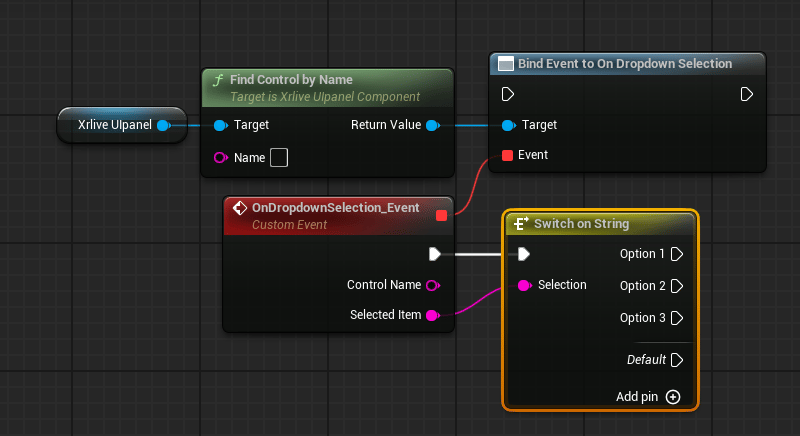
Blueprint graph showing Xrlive Ulpanel reference connected to Find Control by Name, whose Return Value feeds the Target pin of Bind Event to On Dropdown Selection. A Custom Event node named OnDropdownSelection_Event exposes Control Name and Selected Item output pins. The Selected Item pin connects to a Switch on String node with Option 1, Option 2, Option 3, and Default output pins.

Dropdown wiring — Find Control by Name feeds Bind Event to On Dropdown Selection; Selected Item is routed into a Switch on String to branch per option

The custom event exposes two output pins:
Each option in a dropdown typically drives a different behavior, so it is common to route Selected Item into a Switch on String node and handle each case in its own branch. This is a recommendation, not a requirement — how the selected value is consumed is entirely up to the developer.

Populating options at runtime

If the list of options needs to be built dynamically — for example, from a data table or an external source — you can populate the dropdown at runtime using Set Dropdown Options By Name instead of, or in addition to, the static Dropdown Options array in UICategories.
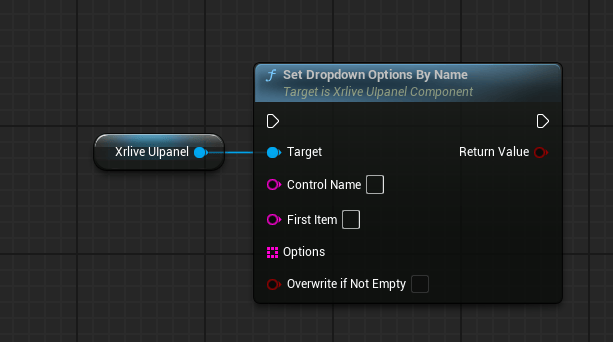
Blueprint graph showing Xrlive Ulpanel reference connected to Set Dropdown Options By Name. The node exposes Control Name, First Item, Options (array), and Overwrite if Not Empty input pins, and a Return Value output pin.

Set Dropdown Options By Name — populates the dropdown list at runtime