

Configuration
Buttons are declared insideUICategories on the xrlive_UIpanel component. Set Type to Xrlive Button and fill in the fields below.
Blueprint API
CallFind Control by Name on the xrlive_UIpanel reference, passing the button’s Name. Feed the Return Value into Bind Event to On Button Click. Create a Custom Event and connect it to the Event pin.
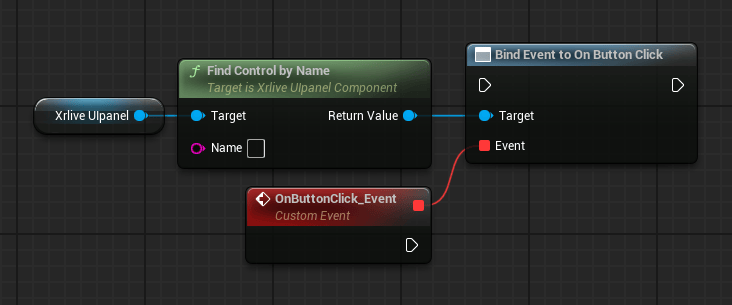
Button wiring — Find Control by Name feeds Bind Event to On Button Click
Variants
Back Button
The Back Button is a navigation variant of the standard button. It is intended for visuals that present operator categories one at a time — instead of stacking all categories in a scrollable list, the visual shows a single category per view and uses a Back Button to let the operator return to the previous view.
The Blueprint wiring is identical to the standard button:
Find Control by Name → Bind Event to On Button Click → Custom Event. The navigation behavior itself is implemented in the event handler logic.