

A Checkbox exposes a boolean toggle to the operator. Each time the operator changes its state, Blueprint receives the new value through a bound event.

Configuration

Checkboxes are declared inside UICategories on the xrlive_UIpanel component. Set Type to Xrlive Checkbox and fill in the fields below.

Blueprint API

Call Find Control by Name on the xrlive_UIpanel reference, passing the checkbox’s Name. Feed the Return Value into Bind Event to On Check Change. Create a Custom Event and connect it to the Event pin.
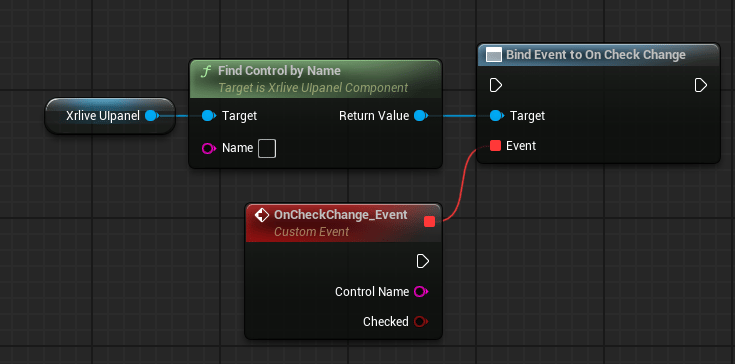
Blueprint graph showing Xrlive Ulpanel reference connected to Find Control by Name, whose Return Value feeds the Target pin of Bind Event to On Check Change. A Custom Event node named OnCheckChange_Event is connected to the Event pin and exposes two output pins: Control Name (string) and Checked (bool).

Checkbox wiring — Find Control by Name feeds Bind Event to On Check Change

The custom event exposes two output pins: