> ## Documentation Index
> Fetch the complete documentation index at: https://xrlive.mintlify.site/llms.txt
> Use this file to discover all available pages before exploring further.
# Text Input
> Free-text field that delivers the typed string to Blueprint
A **Text Input** exposes a free-text field to the operator. Blueprint receives the current string value through a bound event. The moment the event fires depends on the **Commit Change** setting.
***
## Configuration
Text inputs are declared inside `UICategories` on the `xrlive_UIpanel` component. Set **Type** to `Xrlive Text` and fill in the fields below.
| Field | Type | Description |
| ----------------- | ------ | -------------------------------------------------------------------------------------------------------------------- |
| **Name** | String | Unique ID of the control. Must match exactly (case and spaces) when referenced in Blueprint. |
| **Tooltip** | String | Optional helper text shown to the operator on hover. |
| **Default Value** | String | The text pre-filled in the field when the visual loads. The field has no hint text — if left empty, it starts blank. |
| **Commit Change** | Bool | Controls when the bound event fires. See the table below. |
| Commit Change | When the event fires |
| ------------- | --------------------------------------------------------------- |
| `true` | When the operator presses **Enter** or the field loses focus. |
| `false` | On every keystroke — each time a character is typed or deleted. |
Use `true` for inputs that trigger heavy operations (queries, scene reloads, network calls) to avoid firing on every keystroke. Use `false` when the visual needs to react in real time as the operator types.
***
## Blueprint API
Call `Find Control by Name` on the `xrlive_UIpanel` reference, passing the text input's **Name**. Feed the **Return Value** into `Bind Event to On Text Change`. Create a **Custom Event** and connect it to the **Event** pin.
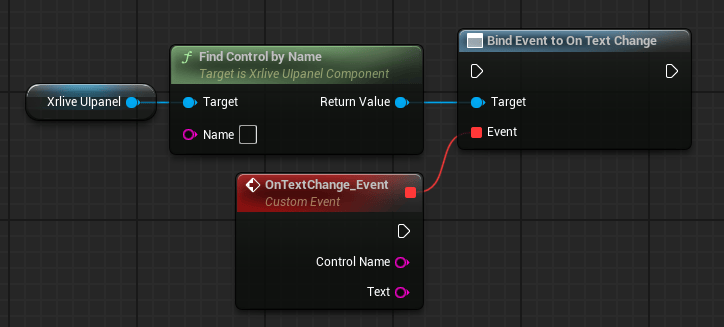 The custom event exposes two output pins:
| Pin | Type | Description |
| ---------------- | ------ | ---------------------------------------------------------------------------------------------------- |
| **Control Name** | String | The name of the text input that fired the event. Useful when one event handles multiple text fields. |
| **Text** | String | The current content of the text field at the moment the event fired. |
The custom event exposes two output pins:
| Pin | Type | Description |
| ---------------- | ------ | ---------------------------------------------------------------------------------------------------- |
| **Control Name** | String | The name of the text input that fired the event. Useful when one event handles multiple text fields. |
| **Text** | String | The current content of the text field at the moment the event fired. |