> ## Documentation Index
> Fetch the complete documentation index at: https://xrlive.mintlify.site/llms.txt
> Use this file to discover all available pages before exploring further.
# Slider
> Float control with configurable range, default value, and optional audio-reactive mode
A **Slider** exposes a draggable float value to the operator. The operator can move it within the configured range and the Blueprint receives the new value in real time through a bound event.
***
## Configuration
Sliders are declared inside `UICategories` on the `xrlive_UIpanel` component. Set **Type** to `Xrlive Slider` and fill in the fields below.
| Field | Type | Description |
| ------------------ | ------ | ----------------------------------------------------------------------------------------------------------------------------------------------------------------------------------------------------------------------------------------------------- |
| **Name** | String | Unique ID of the control. Must match exactly (case and spaces) when referenced in Blueprint. |
| **Tooltip** | String | Optional helper text shown to the operator on hover. |
| **Audio Reactive** | Bool | Controls whether the audio-reactive toggle button on the slider is **enabled or disabled** in the operator panel. When enabled, the operator can activate or deactivate audio-reactive mode at runtime. When disabled, the button is non-interactive. |
| **Default Value** | Float | The initial value the slider holds when the visual loads. Defaults to `0.0`. |
| **Min Value** | Float | Lower bound of the slider range. Can be negative. Defaults to `0.0`. |
| **Max Value** | Float | Upper bound of the slider range. Must be greater than Min Value. Defaults to `1.0`. |
Min and Max are not required to be symmetric. A range of `-150` to `300`, or `0.5` to `2.0`, is perfectly valid. The only requirement is that **Max Value** is greater than **Min Value**.
When **Audio Reactive** is enabled, an additional **Audio Reactive Settings** section appears with the following fields:
| Field | Type | Description |
| ---------------- | ----- | -------------------------------------------------------------------------------------------------------------------------------------------------------------- |
| **Slider Scale** | Float | Multiplier applied to the incoming audio signal before it drives the slider value. A value of `1.0` uses the signal as-is; higher values amplify the response. |
| **Beat Type** | Enum | The frequency band the slider reacts to. Options typically include `Bass`, `Mid`, and `High`, depending on the audio engine configuration. |
| **Min Value** | Float | Lower bound of the slider range specifically during audio-reactive mode. Independent from the manual Min Value. |
| **Max Value** | Float | Upper bound of the slider range specifically during audio-reactive mode. Independent from the manual Max Value. |
***
## Blueprint API
### Standard mode
Use this wiring when **Audio Reactive** is disabled (default).
Call `Find Control by Name` on the `xrlive_UIpanel` reference, passing the slider's **Name**. Feed the **Return Value** into `Bind Event to On Slider Value`. Create a **Custom Event** and connect it to the **Event** pin.
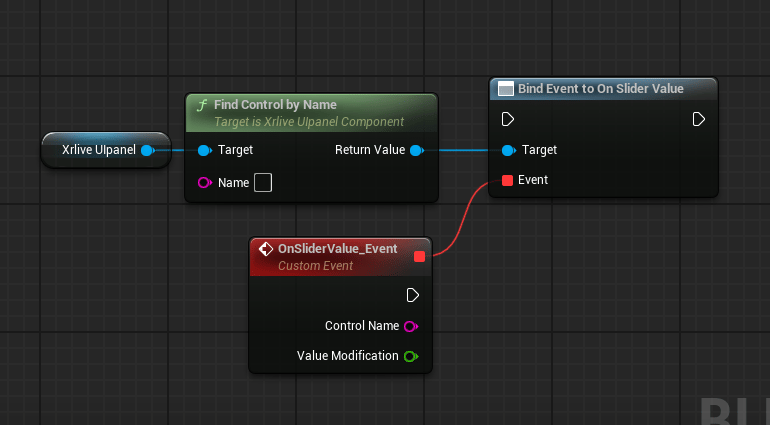 The custom event exposes two output pins:
| Pin | Type | Description |
| ---------------------- | ------ | -------------------------------------------------------------------------------------------- |
| **Control Name** | String | The name of the slider that fired the event. Useful when one event handles multiple sliders. |
| **Value Modification** | Float | The current value of the slider, within the configured Min / Max range. |
### Audio Reactive mode
When **Audio Reactive** is enabled on the slider, use `Bind Event to On Beat Button Click` instead. The event fires in sync with the audio beat signal rather than on operator drag.
The custom event exposes two output pins:
| Pin | Type | Description |
| ---------------------- | ------ | -------------------------------------------------------------------------------------------- |
| **Control Name** | String | The name of the slider that fired the event. Useful when one event handles multiple sliders. |
| **Value Modification** | Float | The current value of the slider, within the configured Min / Max range. |
### Audio Reactive mode
When **Audio Reactive** is enabled on the slider, use `Bind Event to On Beat Button Click` instead. The event fires in sync with the audio beat signal rather than on operator drag.
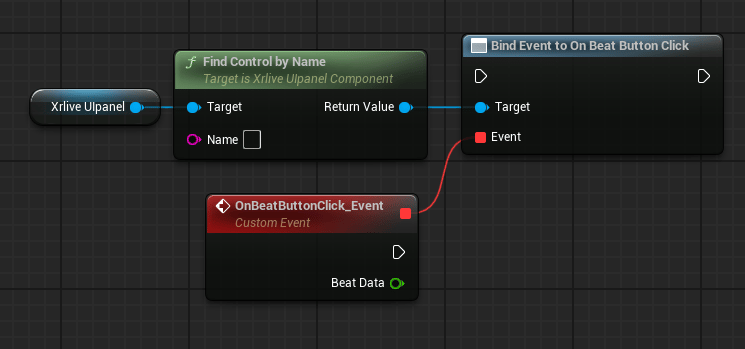 | Pin | Type | Description |
| ------------- | ------ | ------------------------------------------------------------------------------ |
| **Beat Data** | Struct | Contains the beat signal data delivered by the xRLive audio engine at runtime. |
When **Audio Reactive** is enabled on a slider, both bindings should be wired: `Bind Event to On Slider Value` handles manual operator input, and `Bind Event to On Beat Button Click` handles the audio beat signal. The two events fire from independent sources and do not interfere with each other.
| Pin | Type | Description |
| ------------- | ------ | ------------------------------------------------------------------------------ |
| **Beat Data** | Struct | Contains the beat signal data delivered by the xRLive audio engine at runtime. |
When **Audio Reactive** is enabled on a slider, both bindings should be wired: `Bind Event to On Slider Value` handles manual operator input, and `Bind Event to On Beat Button Click` handles the audio beat signal. The two events fire from independent sources and do not interfere with each other.