> ## Documentation Index
> Fetch the complete documentation index at: https://xrlive.mintlify.site/llms.txt
> Use this file to discover all available pages before exploring further.
# Dropdown
> String selection control with a configurable list of options
A **Dropdown** presents the operator with a fixed list of string options. When the operator selects an item, Blueprint receives the selected string through a bound event.
***
## Configuration
Dropdowns are declared inside `UICategories` on the `xrlive_UIpanel` component. Set **Type** to `Xrlive Dropdown` and fill in the fields below.
| Field | Type | Description |
| -------------------- | --------------- | ------------------------------------------------------------------------------------------------------------------------------------------ |
| **Name** | String | Unique ID of the control. Must match exactly (case and spaces) when referenced in Blueprint. |
| **Tooltip** | String | Optional helper text shown to the operator on hover. |
| **Dropdown Options** | Array of String | The list of selectable options. Each entry is a string typed manually. Add as many options as needed. |
| **Selected Item** | String | The option that is active when the visual loads. Must match one of the entries in **Dropdown Options** exactly — same casing, same spaces. |
If **Selected Item** is left empty or does not match any entry in **Dropdown Options**, the dropdown will start with no selection at runtime. Always verify that the value is an exact match of one of the declared options.
***
## Blueprint API
Call `Find Control by Name` on the `xrlive_UIpanel` reference, passing the dropdown's **Name**. Feed the **Return Value** into `Bind Event to On Dropdown Selection`. Create a **Custom Event** and connect it to the **Event** pin.
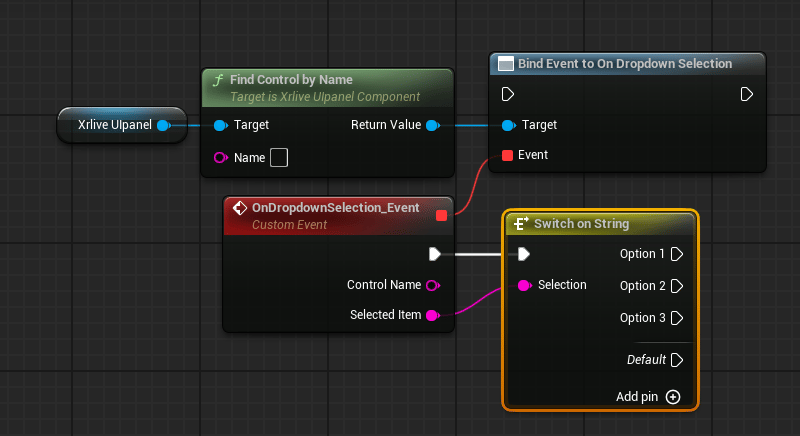 The custom event exposes two output pins:
| Pin | Type | Description |
| ----------------- | ------ | ------------------------------------------------------------------------------------------------ |
| **Control Name** | String | The name of the dropdown that fired the event. Useful when one event handles multiple dropdowns. |
| **Selected Item** | String | The string value of the option the operator selected. |
Each option in a dropdown typically drives a different behavior, so it is common to route **Selected Item** into a `Switch on String` node and handle each case in its own branch. This is a recommendation, not a requirement — how the selected value is consumed is entirely up to the developer.
***
## Populating options at runtime
If the list of options needs to be built dynamically — for example, from a data table or an external source — you can populate the dropdown at runtime using `Set Dropdown Options By Name` instead of, or in addition to, the static **Dropdown Options** array in `UICategories`.
The custom event exposes two output pins:
| Pin | Type | Description |
| ----------------- | ------ | ------------------------------------------------------------------------------------------------ |
| **Control Name** | String | The name of the dropdown that fired the event. Useful when one event handles multiple dropdowns. |
| **Selected Item** | String | The string value of the option the operator selected. |
Each option in a dropdown typically drives a different behavior, so it is common to route **Selected Item** into a `Switch on String` node and handle each case in its own branch. This is a recommendation, not a requirement — how the selected value is consumed is entirely up to the developer.
***
## Populating options at runtime
If the list of options needs to be built dynamically — for example, from a data table or an external source — you can populate the dropdown at runtime using `Set Dropdown Options By Name` instead of, or in addition to, the static **Dropdown Options** array in `UICategories`.
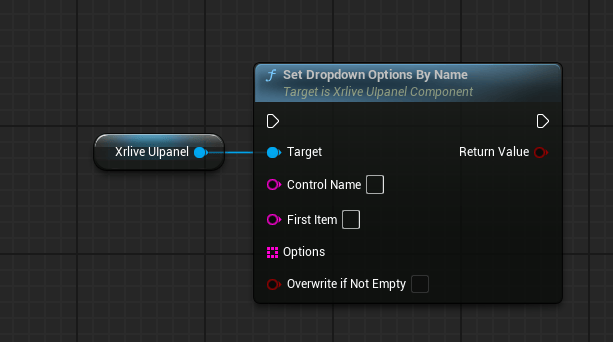 | Pin | Type | Description |
| -------------------------- | --------------- | -------------------------------------------------------------------------------------------------------------------------------------------------------------------------------------------------------------------------- |
| **Control Name** | String | The name of the dropdown to populate. Must match the control's **Name** field exactly. |
| **First Item** | String | The option that will be selected by default once the list is applied. |
| **Options** | Array of String | The full list of options to load into the dropdown. |
| **Overwrite if Not Empty** | Bool | When `true`, the runtime list replaces any options already declared in `UICategories`. When `false`, the static list in `UICategories` takes priority and the runtime list is ignored if the dropdown already has options. |
| Pin | Type | Description |
| -------------------------- | --------------- | -------------------------------------------------------------------------------------------------------------------------------------------------------------------------------------------------------------------------- |
| **Control Name** | String | The name of the dropdown to populate. Must match the control's **Name** field exactly. |
| **First Item** | String | The option that will be selected by default once the list is applied. |
| **Options** | Array of String | The full list of options to load into the dropdown. |
| **Overwrite if Not Empty** | Bool | When `true`, the runtime list replaces any options already declared in `UICategories`. When `false`, the static list in `UICategories` takes priority and the runtime list is ignored if the dropdown already has options. |