> ## Documentation Index
> Fetch the complete documentation index at: https://xrlive.mintlify.site/llms.txt
> Use this file to discover all available pages before exploring further.
# Color Picker
> HSVA color control with manual and audio-reactive modes
A **Color Picker** exposes a full HSVA color selector to the operator. All channels (Hue, Saturation, Value, Alpha) are delivered together through a single bound event — the developer chooses which channels to consume and how to combine them.
***
## Configuration
Color pickers are declared inside `UICategories` on the `xrlive_UIpanel` component. Set **Type** to `Xrlive Color Picker` and fill in the fields below.
| Field | Type | Description |
| ------------------ | ------ | -------------------------------------------------------------------------------------------------------------------------------------------------------------------------------------------------------------------------------------------------------------------------------------------------------------------------------- |
| **Name** | String | Unique ID of the control. Must match exactly (case and spaces) when referenced in Blueprint. |
| **Tooltip** | String | Optional helper text shown to the operator on hover. |
| **Default Color** | Color | The initial color value when the visual loads. Set using the inline color picker. |
| **Audio Reactive** | Bool | Controls whether the audio-reactive toggle button on the color picker is **enabled or disabled** in the operator panel. The button is always visible regardless of this setting. When enabled, the operator can activate or deactivate audio-reactive mode at runtime. When disabled, the button is visible but non-interactive. |
***
## Blueprint API
### Standard mode
Use this wiring when the operator controls the color manually.
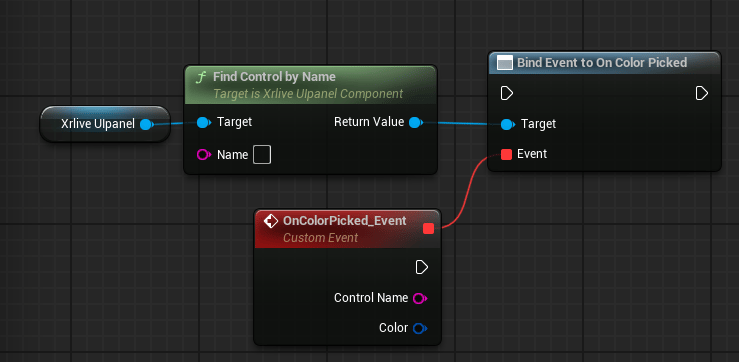
Call `Find Control by Name` on the `xrlive_UIpanel` reference, passing the color picker's **Name**. Feed the **Return Value** into `Bind Event to On Color Picked`. Create a **Custom Event** and connect it to the **Event** pin.
 | Pin | Type | Description |
| ---------------- | ------------ | --------------------------------------------------------------------------------------------------------------------------------------------------- |
| **Control Name** | String | The name of the color picker that fired the event. Useful when one event handles multiple color pickers. |
| **Color** | Linear Color | The full HSVA color value selected by the operator. All channels are available from this single pin — use the individual channel outputs as needed. |
### Audio Reactive mode
When **Audio Reactive** is enabled, wire `Bind Event to On Beat Color` in addition to the standard bind. This event fires in sync with the audio beat signal.
| Pin | Type | Description |
| ---------------- | ------------ | --------------------------------------------------------------------------------------------------------------------------------------------------- |
| **Control Name** | String | The name of the color picker that fired the event. Useful when one event handles multiple color pickers. |
| **Color** | Linear Color | The full HSVA color value selected by the operator. All channels are available from this single pin — use the individual channel outputs as needed. |
### Audio Reactive mode
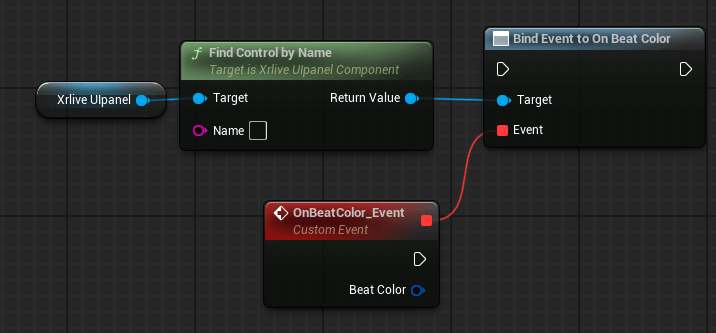
When **Audio Reactive** is enabled, wire `Bind Event to On Beat Color` in addition to the standard bind. This event fires in sync with the audio beat signal.
 | Pin | Type | Description |
| -------------- | ------------ | ---------------------------------------------------------------- |
| **Beat Color** | Linear Color | The HSVA color value driven by the audio beat signal at runtime. |
When **Audio Reactive** is enabled, both bindings should be wired: `Bind Event to On Color Picked` handles manual operator input and `Bind Event to On Beat Color` handles the audio beat signal. The two events fire from independent sources and do not interfere with each other.
| Pin | Type | Description |
| -------------- | ------------ | ---------------------------------------------------------------- |
| **Beat Color** | Linear Color | The HSVA color value driven by the audio beat signal at runtime. |
When **Audio Reactive** is enabled, both bindings should be wired: `Bind Event to On Color Picked` handles manual operator input and `Bind Event to On Beat Color` handles the audio beat signal. The two events fire from independent sources and do not interfere with each other.