> ## Documentation Index
> Fetch the complete documentation index at: https://xrlive.mintlify.site/llms.txt
> Use this file to discover all available pages before exploring further.
# Network Setup
> Configure network adapters and connectivity for xRLive
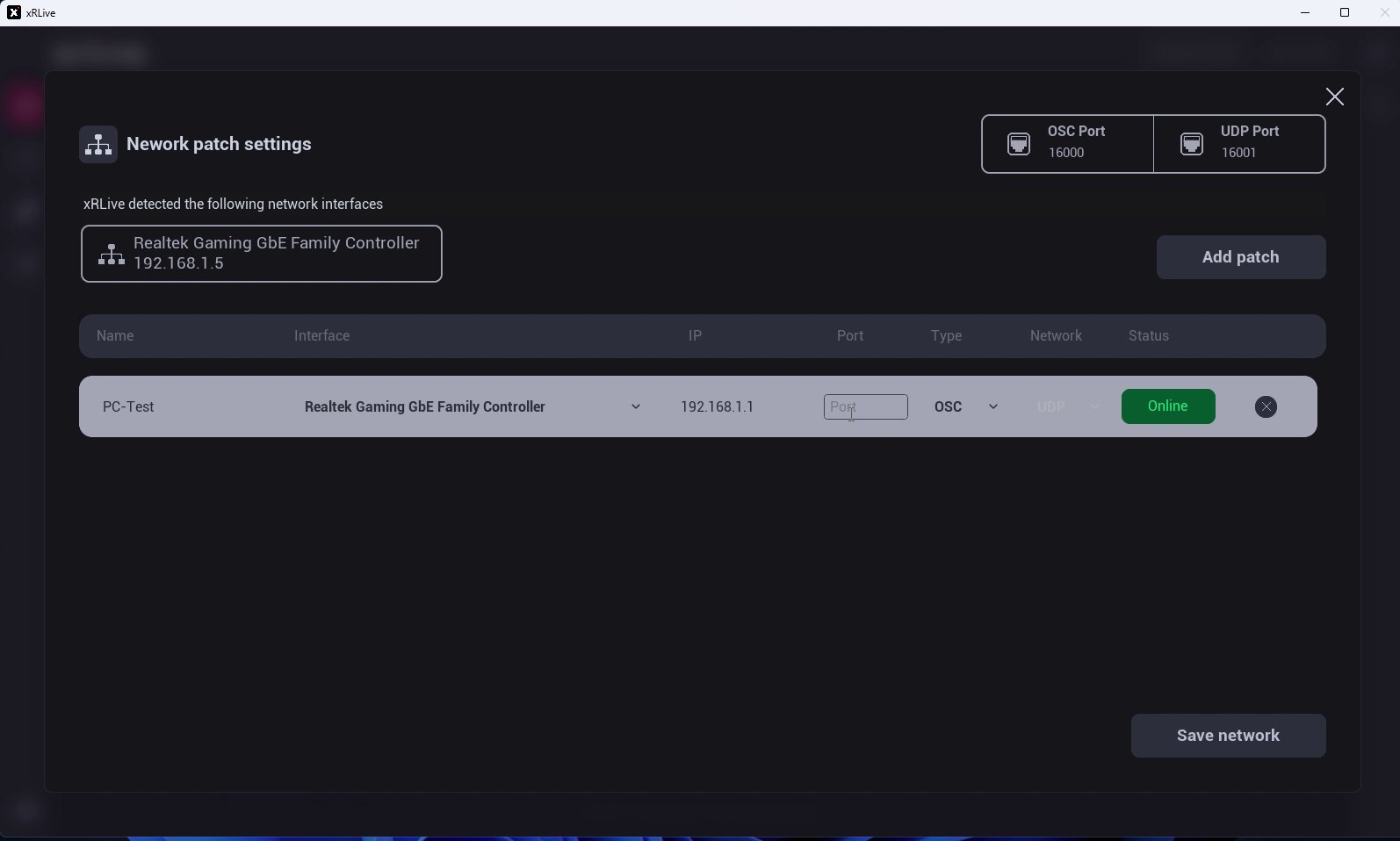
Network Setup — labeled **Network patch settings** in the launcher — is where you set the ports xRLive uses and create the connections ("patches") to external devices such as lighting consoles and OSC software.
Open it from the menu in the top-right corner of the launcher and choose **Network**.
 ## Ports
Two ports sit at the top of the dialog:
* **OSC Port** — the port xRLive listens on for OSC messages. Match it to the console or software that sends the commands. See [OSC Integration](/launcher/output/osc-integration).
* **UDP Port** — the port used for UDP communication.
## Network interfaces
xRLive automatically detects the network interfaces on your machine and lists each one with its IP address. Use this to confirm which network xRLive can reach.
## Patches
A **patch** is a connection between xRLive and an external device. Click **Add patch** to create one, then fill in the row:
* **Name** — a label for the device (e.g. *PC-Test*).
* **Interface** — the network interface to use.
* **Device IP** — the external device's IP address.
* **Port** — the port on the device.
* **Type** — the protocol, such as **TCP** or **OSC**.
* **Status** — shows whether the patch is **Online** or offline.
Remove a patch with the **✕** on its row. When you're done, click **Save network** to apply your changes.
## Ports
Two ports sit at the top of the dialog:
* **OSC Port** — the port xRLive listens on for OSC messages. Match it to the console or software that sends the commands. See [OSC Integration](/launcher/output/osc-integration).
* **UDP Port** — the port used for UDP communication.
## Network interfaces
xRLive automatically detects the network interfaces on your machine and lists each one with its IP address. Use this to confirm which network xRLive can reach.
## Patches
A **patch** is a connection between xRLive and an external device. Click **Add patch** to create one, then fill in the row:
* **Name** — a label for the device (e.g. *PC-Test*).
* **Interface** — the network interface to use.
* **Device IP** — the external device's IP address.
* **Port** — the port on the device.
* **Type** — the protocol, such as **TCP** or **OSC**.
* **Status** — shows whether the patch is **Online** or offline.
Remove a patch with the **✕** on its row. When you're done, click **Save network** to apply your changes.